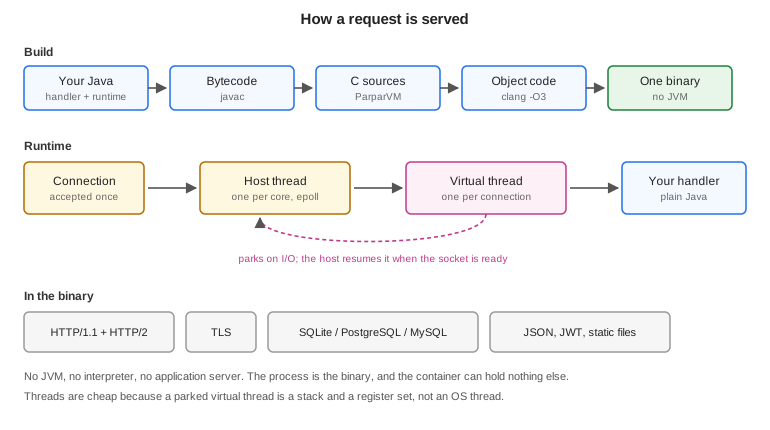
The backend compiles a Java HTTP handler into a native executable. It uses the same ParparVM pipeline as the iOS, Windows and Linux ports: javac produces bytecode, ParparVM turns that into C, and clang compiles the C together with the runtime into one binary. Nothing interprets anything at run time, and there is no JVM underneath.
The measurements in this chapter come from vm/backend/benchmarks on two pinned
cores against 64 connections, and the harness is in the repository so you can
disagree with them.
What this doesn’t replace
Spring Boot, Quarkus, Micronaut and Jakarta EE aren’t the competition here. They carry a security stack, a starter for every service a company runs, a container that discovers beans in any jar on the class path, and two decades of operational knowledge. If you are running a Spring service today and it works, these chapters aren’t asking you to move it.
What this runtime borrows from them is the programming model. Controllers, services, dependency injection, declarative transactions, scheduled jobs and managed beans use Spring’s annotation names and mean what they mean there, so a Spring developer can read a Codename One backend without learning it first. What it doesn’t borrow is the container: every one of those annotations is resolved while the project builds, into ordinary code, and there is nothing left to interpret when the server runs.
What those frameworks assume is a JVM, and that paying for one is reasonable. For most server work that assumption holds. This exists for the work where it fails.
Why it exists
A JVM charges you twice. It charges start-up on every cold process, and it charges a baseline heap for as long as the process lives. Both are fine when a service runs for weeks and handles millions of requests. Neither is fine when the process exits after 200 milliseconds, when you are billed per invocation, or when the instance is capped at 128 MB.
That describes a specific and growing slice of server work: serverless functions, sidecars, edge workers, webhook receivers, small always-on services. Java is thin on the ground there, and the reason is arithmetic rather than taste. Teams therefore reach for Go or Node, and a Java shop that does this ends up with two languages, two toolchains, and two definitions of every object that crosses the wire.
The point of the backend is to remove the reason to leave Java for that slice. It doesn’t try to take work the JVM already does well.
How the backend chapters fit together
This chapter covers what every server needs: the module, the build, the concurrency model and configuration. The chapters after it each take one part of a server and go into depth:
Backend controllers, contracts and WebSockets: mapping HTTP requests to methods, sharing a typed contract with the app, and holding WebSocket connections open.
Backend beans and dependency injection: splitting a server into services the build wires together, with scopes, conditions and configuration binding.
Backend data access and transactions: the connection pool, the object mapping, and
@Transactionalin full, with propagation, rollback rules and savepoints.Backend sessions: keeping state for a client across requests.
Backend scheduling and background work: running work later, on a schedule, or on another thread.
Backend tracing, metrics and management: traces, metrics, managed beans and the management endpoints.
Backend MCP and the agent loop: letting an AI agent call the server’s tools, and giving an agent that builds the server a way to inspect and exercise it.
Backend performance, deployment and limits: the measurements, deployment, and the limits worth knowing before choosing this.
A first server
The archetype and the initializr both generate a backend module beside the
client ones:
myapp/
  common/    shared app code
  javase/    desktop build
  ios/       iOS build
  android/   Android build
  backend/   the server
    pom.xml
    src/main/java/com/example/myapp/Notes.java
A server is a class with routes on it. The annotations are Spring’s, under Codename One’s package names, so this reads the same way to anyone who has written a Spring controller:
@RestController
@RequestMapping("/notes")
public class Notes {
    private final Map<Long, Map> store =
            Collections.synchronizedMap(new LinkedHashMap<Long, Map>());
    private final AtomicLong nextId = new AtomicLong(1);

    @GetMapping("/healthz")
    public String health() {
        return "ok";
    }

    @GetMapping("/{id}")
    public Map read(@PathVariable("id") long id) {
        return store.get(Long.valueOf(id));      // null becomes a 404
    }

    @GetMapping
    public List list(@RequestParam(value = "limit", defaultValue = "20") int limit) {
        List page = new ArrayList();
        synchronized (store) {                   // iterating needs the map's own lock
            for (Map note : store.values()) {
                if (page.size() >= limit) {
                    break;
                }
                page.add(note);
            }
        }
        return page;
    }

    @PostMapping
    @ResponseStatus(201)
    public Map create(@RequestBody Map note) {
        long id = nextId.getAndIncrement();
        Map stored = new LinkedHashMap(note);
        stored.put("id", Long.valueOf(id));
        store.put(Long.valueOf(id), stored);
        return stored;
    }

    @DeleteMapping("/{id}")
    @ResponseStatus(204)
    public void delete(@PathVariable("id") long id) {
        store.remove(Long.valueOf(id));
    }
}
There is no main here, and that’s the point. Every server opens with the same
twenty lines — start a listener, install a shutdown handler, wait on it — and
getting any of them wrong produces one that leaks connections on SIGTERM, or one
that ends the moment main returns and says nothing about why. The build writes
those lines, from the controllers it finds.
It also writes the router. The obvious hand-written form,
if ("/healthz".equals(request.getTarget())), builds a String for the target,
hashes it and compares it — for every route it tries before the one that matches,
on every request — and breaks as soon as a client appends ?probe=1. The
generated router holds each route as a byte[] and asks the request whether its
path bytes are those bytes, so a route with no path variables allocates nothing at
all and a query string can’t break it.
The return value decides the response. A String is sent as text, anything else as
JSON, null is a 404, and @ResponseStatus sets the code for the cases where 200
isn’t it. A handler that needs something this doesn’t model takes the
HttpServer.Request itself and answers exactly as it would have before.
Two commands matter:
# the property is not optional: the backend module lives in a profile, and
# without it Maven cannot see it in the reactor at all
mvn -pl backend -Dcodename1.platform=backend cn1:backend           # run it on this JVM
mvn -pl backend -Dcodename1.platform=backend cn1:backend-package   # build the native binary
The first is the development loop. Both run the same protocol code — there is one
copy of HttpServer, and only the layer underneath it differs — so behaviour
can’t drift between the loop you develop in and the binary you ship. The local
run doesn’t terminate TLS, by design, and therefore doesn’t serve HTTP/2:
both refuse with a message that says so, because a second TLS implementation
would have its own bugs rather than production’s.
What the build writes
Every annotation in these chapters is read from the compiled classes, after javac
and before the translator, during the process-classes phase. The build works out
everything the annotations ask for and writes it down as plain Java, so the
translator and the dead-code pass see an ordinary program:
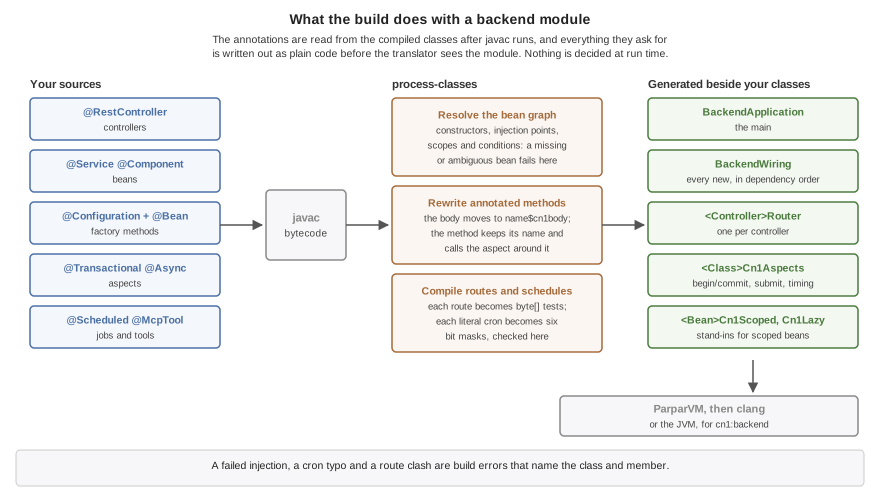
BackendApplicationis themain. It builds the configuration, opens the database, starts the server and installs the shutdown handler.BackendWiringis the whole of dependency injection: anewfor each bean in dependency order, the calls that set its injected fields, and its@PostConstructmethod. Backend beans and dependency injection describes what goes into it.A
Routerper controller holds each route as abyte[]and binds each parameter with code written for its type.A
Cn1Aspectsclass per annotated class carries what@Transactional,@Async,@Timedand@Countedadd around a method. The method keeps its name and signature, its body moves to a method of its own, and the method calls the aspect around that body.
That has three consequences worth knowing from the start. A dependency that can’t be satisfied, a route claimed twice and a cron expression with a typo are build errors, each naming the class and member at fault, rather than failures the first request finds. Starting a server with fifty beans costs what the fifty constructors cost, because there is no scan and no lookup. And a feature the application skips isn’t in the binary at all: the translator drops every class nothing references, and the generated code references only what the annotations asked for.
The generated classes land in target/classes beside the module’s own. To see
what the build decided about the beans without reading bytecode, ask a running
development server: the backend_beans tool described in Backend MCP and the agent loop lists
every bean, its scope and what was injected into it.
A process runs one backend. Starting a second while the first is running fails with an error; starting again after it has stopped is fine. To scale out, run more processes: keep sessions in the database store and give scheduled jobs a lock, so the instances share them.
Virtual threads and the request loop
The concurrency model is the part most worth understanding, because it’s what makes a handler that blocks acceptable.
Every connection gets a virtual thread. Not a pooled worker that a connection borrows for one request — a stack that belongs to that connection until it closes. The handler can block on a socket read, a database round trip or a file, and it costs a parked stack rather than an OS thread.
Host threads run those virtual threads, and there is one host per core. A descriptor is registered in exactly one host’s epoll set, so it can only ever be reported to that host, and only that host ever touches its virtual thread. That affinity is why the scheduler needs no locks on the hot path.
The loop is: the host polls, a descriptor becomes readable, the host resumes that connection’s virtual thread, the handler runs until it needs bytes that haven’t arrived, and it parks. Parking returns control to the host, which polls again. When the handler finishes a response the descriptor stays armed, so the next request on that connection costs no system call to set up.
These are ParparVM’s own virtual threads, a feature of the translated runtime, and
they aren’t the virtual threads of Java 21 and later. The two share a name and
little else. A Java virtual thread unmounts whenever the JDK blocks on its behalf.
One of these switches stacks in the translated C code and parks only where the
runtime has made parking possible: waiting on a socket. That covers the connection
it serves and every outbound one — a PostgreSQL or MySQL query, a Web call, a
TLS handshake — so a handler waiting on another service costs a parked stack, and
the host serves other connections meanwhile. Anything else that blocks holds the
host thread under it and every virtual thread that host runs: SQLite and file
access, which are local calls rather than sockets, resolving a host name, and
Object.wait(). They’re also pinned: a virtual thread stays on one host for its
whole life.
That’s why the development run on the JVM doesn’t use Java’s virtual threads to
stand in for them, even for debugging. It serves connections on a pool of platform
threads and runs VIRTUAL work on platform threads too. Code that’s correct
there can still stall a host on the native build, so test anything that depends on
how threads interleave — a handler that waits, a task that blocks — on the
native server.
Host count follows cores rather than the workers argument. On two pinned cores,
16 hosts served 117 requests where 2 hosts served 257,297: past one host per core
they compete for the cores the server needs. In this mode workers stops meaning
"requests in flight," because the virtual threads supply that.
The life of a request
A server’s handlers are arranged in a chain, and each one either answers a request or
passes it on by answering null. The order is fixed, so which handler wins
never depends on registration order or on what happens to be in a directory:
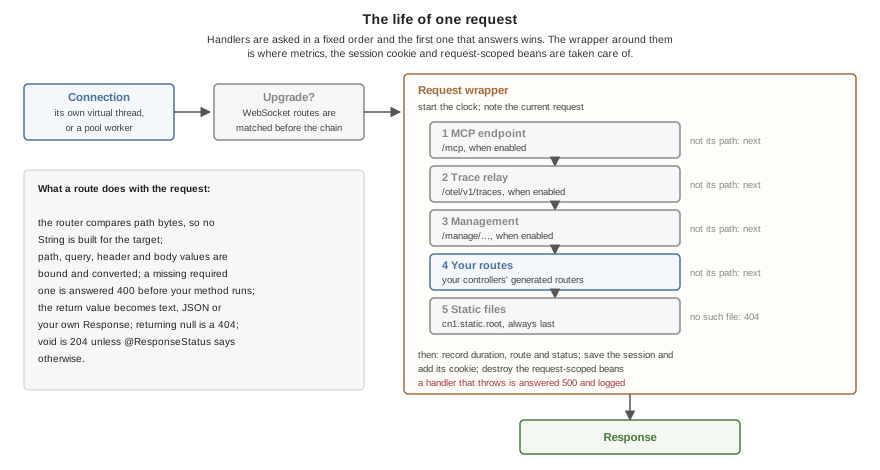
A WebSocket upgrade is matched first, against the
@WebSocketMappingroutes, and never reaches the chain.The server’s own endpoints come next, each only when it’s turned on: MCP at
/mcp, the trace relay at/otel/v1/traces, and the management endpoints under/manage. They come before the application’s routes so a catch-all route can’t answer a health check.Then the application’s routes.
Static files from
cn1.static.rootare always last, so a file can’t shadow a route by being named like one.A request nothing answered is a 404.
Around the chain sits one wrapper, and it’s where the per-request features
live. It starts the clock for the request duration metric, makes the request
available to request-scoped beans, and records the request for the development
tools. After the chain answers it saves the session and adds its cookie, destroys
the request’s request-scoped beans, and records the duration under the route that
matched. A handler that throws is answered with a 500 whose body says only
internal error, and the exception goes to the log rather than to the client.
Configuration and profiles
A server runs against a file on a laptop and a managed database in production, and the difference between those two can’t live in the source. It lives in properties files beside the binary and in the environment:
application.properties, committed:
cn1.datasource.url=${DATABASE_URL}
cn1.server.port=8080
application-dev.properties, also committed:
cn1.datasource.url=:memory:
CN1_PROFILE=dev ./server                         # SQLite, nothing installed
DATABASE_URL=postgres://app:secret@db/app ./server   # production
A key is resolved in one order, and the first layer that has it wins: a system
property of that exact name, then the environment variable it maps to
(cn1.datasource.url becomes CN1_DATASOURCE_URL), then the environment
variable a platform already sets for it, then
application-<profile>.properties, then application.properties.
The third layer is worth spelling out. PORT and DATABASE_URL are set for you
by every platform-as-a-service worth the name, and a server that ignored them
would need a wrapper script to start at all, so they’re read where those two
keys are read.
A value may name an environment variable as ${NAME} or ${NAME:fallback}, and
that reference resolves when the value is READ rather than when the file loads.
That’s what lets the committed application.properties above name a variable
only production sets: the development profile overrides the key, so the unset
variable is never read. A reference that’s read and can’t be resolved fails
with a message naming it, because the alternative is a server that opens a SQLite file
called ${DATABASE_URL} and finds it empty.
Nothing here is required. A binary with no properties file beside it reads its
whole configuration from the environment, which is the normal shape for a
container built FROM scratch: there is no file next to the binary because
there is nothing next to the binary.
| Key | What it sets |
|---|---|
| The active profile. |
| A SQLite path, or a |
| How many connections to hold. The default is eight for a server engine, four for a SQLite file and one for an in-memory database. |
| The port. Also read from |
| The size of the request thread pool, 16 by default. Under virtual threads it no longer bounds the requests in flight; see Virtual threads and the request loop. |
| A PEM certificate and key to terminate TLS with. One without the other is refused rather than serving plaintext under a name that promises otherwise. |
| A directory to serve files from, after every route. |
| Whether the generated daos create their tables at start-up. True on a development profile, false everywhere else. |
| The directory the properties files are read from; the working directory by default. Read only from a system property or the environment, since it decides where the files are. |
| The listen backlog, 512 by default. |
| How long a stop waits for the requests in flight, 10 seconds by default. Zero means don’t wait. |
| Whether a TLS server offers HTTP/2 through ALPN. True by default. |
| Where static files are served ( |
| How long a request waits for a free connection before it fails, 10 seconds by default. |
| How long SQLite waits on a locked database file, 5 seconds by default. |
One limit is read only from the environment, because it’s fixed when the server
class loads: CN1_HTTP_MAX_UPLOAD_MB, 64 by default, bounds the request bodies
being received at once across all HTTP/1.1 connections. A request that would pass
the limit gets a 503 rather than being buffered.
The chapters that follow add their own keys — cn1.session.,
cn1.task.executor., cn1.management., cn1.mcp. and cn1.otel.* — and
list each one where it’s described.
Settings in source
A server that ships as one executable often has no properties file beside it, so the common settings can also be written as annotations, on any class in the backend module:
@Configuration
@ServerConfig(port = 8080, workers = 32)
@SessionConfig(store = "db", timeoutSeconds = 3600)
public class AppSettings {
}
Each attribute is one key — port is cn1.server.port, store is
cn1.session.store — and the build compiles its value in as the bottom layer of
the configuration, below application.properties. A properties file or the
environment still changes it without a rebuild, and an attribute left out sets
nothing. A value the server would refuse at start-up, such as a session store
that isn’t memory or db, is a build error naming the class instead, and so
are two classes that give one key different values.
| Annotation | Keys |
|---|---|
|
|
|
|
|
|
|
|
| turns tracing on and names the service; |
| builds the management endpoints in; |
| builds the MCP endpoint in; |
Secrets — a token, a password inside a database URL — don’t belong in source.
Name them as ${NAME} in the annotation or leave them to the environment, which
is where the server reads a token from.
Handlers that need any of this get it from the entry point the build writes.