Not everything a server does fits inside a request. A report takes a minute to
build, webhooks go out after the response, a cleanup runs every night. This chapter
covers the three ways to run work outside a request: @Async methods, which
return before their work is done; @Scheduled methods, which run on a timetable;
and Tasks, for a one-off piece of work. All three run on named executors, and
each chooses between platform and virtual threads.
Background work
The annotations are Spring’s, on ordinary bean methods:
@Service
public class Reports {
    @Async
    public Future<String> monthly(String month) {
        return AsyncResult.of(render(month));
    }

    @Async(thread = ThreadKind.VIRTUAL)
    public void notifyWebhooks(String event) {
        // outbound calls that mostly wait
    }

    @Scheduled(cron = "0 0 3 * * *", zone = "Europe/Berlin")
    public void nightly() {
        // every day at 03:00 Berlin time
    }

    @Scheduled(fixedDelay = 60000, lock = "purge")
    public void purge() {
        // once a minute, on one instance at a time
    }
The build rewrites each @Async method so that it packages its arguments into a
task, hands the task to an executor and returns. Each @Scheduled method is
registered with the server’s scheduler, with a literal cron expression already
compiled into bit masks. Neither involves a proxy, so both work however the
method is called.
Asynchronous methods
An @Async method returns void or a java.util.concurrent.Future; any other
return type is a build error, because the caller returns before there is anything
to return. Future, the ExecutionException, TimeoutException and
CancellationException its get() throws, and TimeUnit aren’t part of the
client’s Java subset: they’re backend API, documented in the backend API reference
and tested on the translated runtime. The body returns AsyncResult.of(value),
and the caller receives, immediately, a Future that completes with that value
when the body has run:
get()waits for the body and returns its value. On a virtual thread it yields its host while it waits rather than blocking it, so a request handler can wait for an@Async(thread = VIRTUAL)task without stalling the other connections that host serves.An exception the body throws comes out of
get()wrapped in anExecutionException.cancel()succeeds only before the body starts. A running body is never interrupted.
A void method has no Future to deliver a failure through, so an exception it
throws is logged, counted against its executor, and recorded on the task’s span.
The task runs in a span of its own whose parent is the caller’s, so background work
shows up in a trace under the request that started it.
A synchronized @Async method holds its monitor while the body runs on the
executor’s thread, not merely while it hands the task over, so two calls still
never run the body at once.
@Async on a @Scheduled method is a build error: it would end the run as soon
as the work was queued, so runs could overlap and a lock be released early;
@Scheduled already runs off the request thread, on the thread its thread
attribute picks. @Async on a @RequestScope or @SessionScope bean builds with
a warning, as it runs in Spring: the task calls the bean itself, which is destroyed
when its request or session ends, possibly before the task runs.
Arguments are captured when the method is called, and the body runs later on another thread. Pass values rather than objects the caller goes on changing, and remember that the task runs outside the caller’s transaction and outside its request: a request-scoped bean isn’t available to it.
Executors
Background work runs on named executors, created on first use:
| Executor | Used by |
|---|---|
|
|
|
|
|
|
any other name |
|
Each is configured under its own name:
cn1.task.executor.reports.threads=4       # pool size; 8 by default, 2 for scheduling
cn1.task.executor.reports.kind=platform   # platform or virtual; overrides the code
A pool’s threads start with its first task, so an unused executor costs
nothing. A task submitted while every thread is busy waits in the executor’s
queue, and cn1.task.queue_depth reports how many are waiting, by executor.
Platform or virtual threads
thread on @Async and @Scheduled chooses the kind of thread, from
ThreadKind:
| Value | Runs on |
|---|---|
| A thread of the executor’s pool. |
| A virtual thread of its own on the server’s hosts. Where there are none — the development run on the JVM, a TLS server, Windows — on the executor’s pool instead. |
| A virtual thread where the server runs them, a platform thread otherwise. The choice is logged once at start-up. |
VIRTUAL means ParparVM’s own virtual threads, which the native build has, and
not the virtual threads of Java 21: the two behave differently, and the JVM
development run has neither, so it runs VIRTUAL work on platform threads. The
choice matters because of how virtual threads work on this runtime, explained
under Virtual threads and the request loop. A virtual thread parks while it
waits on a socket, so work that queries PostgreSQL or MySQL or calls another
service suits VIRTUAL well: thousands of such waits cost thousands of parked
stacks rather than thousands of threads. What it must not do is block outside a
socket. SQLite and file access are local calls that hold the host thread running
them, and with it every connection that host serves, so work that uses them
belongs on PLATFORM. PLATFORM stays the default, as a pool is in Spring.
Tasks runs a single piece of work without a bean method:
public void rebuildLater() {
    Tasks.platform(new Runnable() {
        public void run() {
            // runs once, on the default pool of platform threads
        }
    });
}
Tasks.virtual does the same on a virtual thread.
Scheduled jobs
A @Scheduled method takes no arguments and gives exactly one of cron,
fixedRate or fixedDelay. Any of them can come from configuration:
@Service
public class Digest {
    @Scheduled(cron = "${digest.cron:0 0 7 * * MON-FRI}", zone = "America/New_York")
    public void weekdayMorning() {
        // 07:00 New York time on weekdays, unless digest.cron says otherwise
    }

    @Scheduled(fixedRateString = "${digest.pollMillis:30000}", initialDelay = 5000,
               executor = "polling", thread = ThreadKind.VIRTUAL)
    public void poll() {
        // every 30 seconds after a 5 second start-up delay, on a virtual thread
    }
Cron expressions
A cron expression has Spring’s six fields, seconds first, separated by spaces:
| Field | Values | Examples |
|---|---|---|
second | 0-59 |
|
minute | 0-59 |
|
hour | 0-23 |
|
day of month | 1-31, or |
|
month | 1-12, or |
|
day of week | 0-7, or |
|
Each field is (or ? for the two day fields), a value, a range a-b, a step
/n, a-b/n or a/n, or a comma-separated list of those. The macros
@yearly (or @annually), @monthly, @weekly, @daily (or @midnight) and
@hourly stand for the usual expressions.
When both day fields are restricted, a day has to match both. That’s Spring’s
rule, and it differs from Unix cron, where matching either is enough:
0 0 12 13 * FRI fires on Friday the 13th and not on every Friday.
A literal expression is parsed by the build, so a mistake — 0 0 25 * * * names
an hour that doesn’t exist — fails the build with the field at fault, rather than
producing a job that never runs, or runs every second. An expression that reads
configuration, ${digest.cron:…} above, is parsed at start-up instead, and a
bad one stops the server.
zone is the time zone the expression is read in: a zone ID such as
Europe/Berlin, a fixed offset such as +02:00, or UTC. Without one it’s UTC,
which is what a server’s clock should be set to regardless. The build checks the name,
and a zone on a job that isn’t a cron job is an error. A zone that comes from
configuration is checked when the schedule is made — against the host’s time-zone
database where it has one — so a misspelled name stops the server instead of
running the job on UTC without a word.
In a zone with daylight saving time, a time the clocks skip doesn’t exist, and a
job due then doesn’t run that day: 0 30 2 * * * in America/New_York skips the
spring-forward night instead of running at 03:30. A time the clocks pass twice, on
the night they go back, runs once, at the first of the two. Once that has passed
the day’s run is spent, so a server started inside the repeated hour doesn’t run it
that night.
Fixed rate and fixed delay
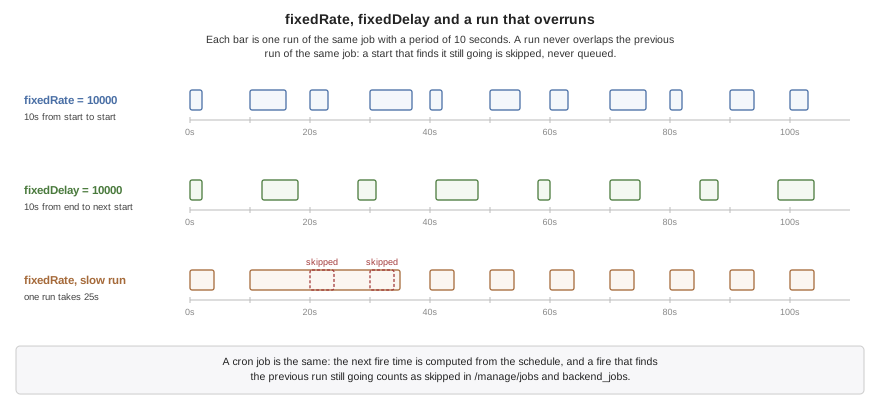
fixedRate starts runs a fixed number of milliseconds apart, measured from start
to start. fixedDelay waits that long after each run ends. initialDelay sets
how long after start-up the first run begins; without it the first run starts as
soon as the server does. The String forms, fixedRateString,
fixedDelayString and initialDelayString, accept a placeholder, so a period can
be configured per deployment.
Runs never overlap
A run never overlaps the previous run of the same job. A start that finds the previous run still going is skipped, and the job is next due at its following time; it doesn’t queue up and run twice to catch up. A fixed-rate job that falls behind resumes on its own grid, without a burst. Each skipped start is counted, so a job that routinely overruns its period shows up in the job listing rather than running less often than it says with nobody noticing.
The scheduler itself is one platform thread that keeps the timetable. The runs happen on the executors, so a slow job delays nothing but its own next run.
One instance at a time
With several instances of a server behind a load balancer, each runs every job.
For a job that should happen once — sending the daily digest, purging old rows — lock names a row it claims first:
@Scheduled(fixedDelay = 60000, lock = "purge")
Before each run the instance tries to claim the named row in a table called
cn1_scheduler_lock, in the server’s own database, and skips the run when another
instance holds it. The claim expires after lockAtMostFor milliseconds — ten
minutes when it isn’t set — so an instance that dies mid-run doesn’t hold the job
forever. Set it longer than the job’s longest run, or two instances can end up
running it at once. The claim’s times come from the database server’s clock, which
every instance shares, so an instance whose own clock runs ahead can’t take a claim
another still holds. With SQLite, which runs in the server’s process, it’s that
host’s clock. A job with a lock needs a database, which the build checks.
A skipped run isn’t a failure. A lock that can’t be claimed for any other reason — the database refusing the statement — is recorded as one, so a broken lock table doesn’t look like a job that’s always somebody else’s turn.
Watching the jobs
A job is named after its class’s simple name and its method, Cleanup.run. When
two classes in different packages share a simple name, both jobs take the
qualified name, com.example.billing.Cleanup.run, so each can be listed and
started on its own.
GET /manage/jobs lists every job with its schedule, its runs, failures and
skipped starts, when it last started, how long that took, the last error, and when
it’s next due. The development MCP server has the same as backend_jobs, and
backend_run_job starts one immediately. The duration of each run is recorded in
the cn1.scheduler.run.duration histogram, by job and outcome.
When the server stops, the scheduler stops first so that no run begins during the
drain, and runs that haven’t finished get the same grace period as the requests in flight.
A task on a virtual thread keeps running on its host thread through that window.
One still running when it ends is abandoned and reported, and its Future never
completes.
Pitfalls
SQLite or file work on a virtual thread blocks the host thread under it, because neither waits on a socket. Leave such work on
PLATFORM. A PostgreSQL or MySQL query parks instead, and is fine onVIRTUAL.Relying on the caller’s context. An
@Asyncbody runs outside the caller’s transaction and request. A transaction it needs, it declares itself.A cron expression read in local time. Without
zoneit’s UTC, so0 0 9 * * *fires at 09:00 UTC, which is the middle of the night somewhere.lockAtMostForshorter than a run. Once the claim expires another instance may start the job while the first is still running it.Several instances without
lock. Every instance runs every job.